Simplify your WordPress workflow!
Build faster, cleaner, and more reliable WordPress websites using lightweight plugins designed for real-world workflows.
Get started now
The Disable tab of Settings → Disable Comments RB decides where comments are turned off. Three choices work independently: where, whether new comments are blocked, and what happens to the comments already on the site.
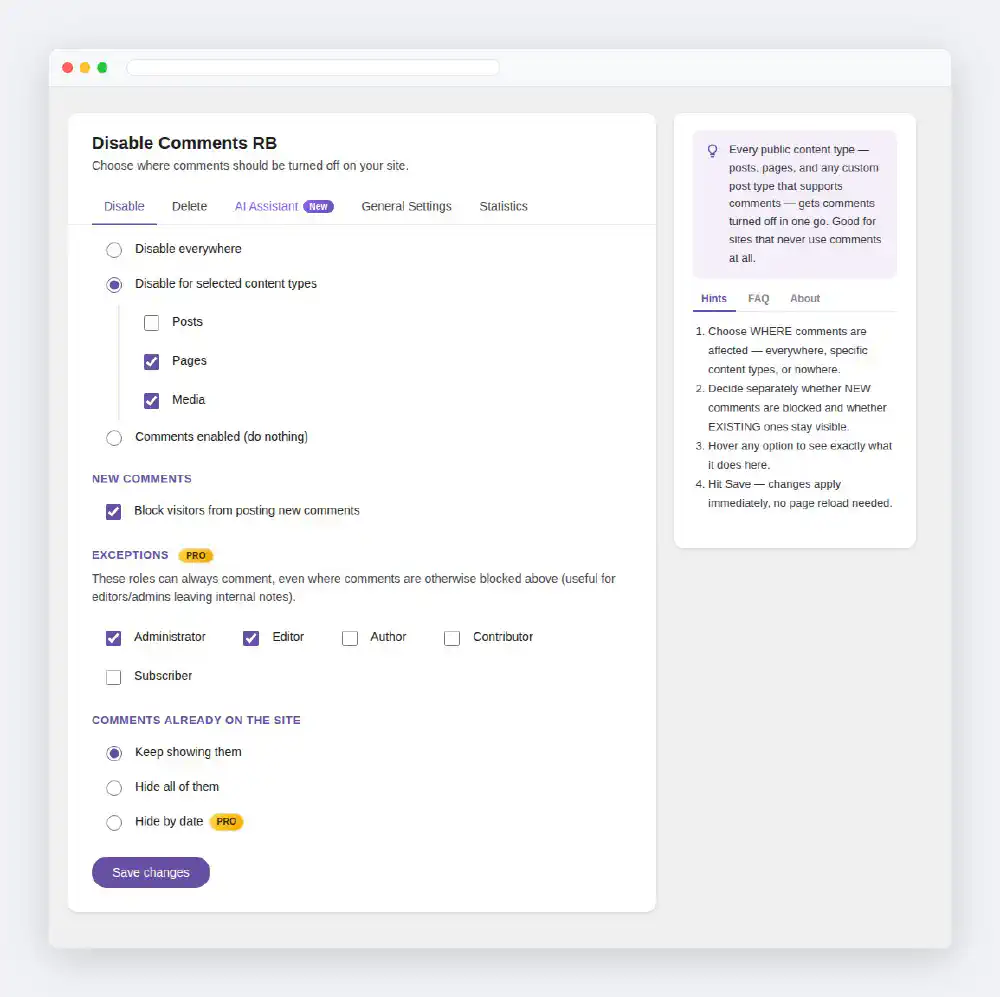
Disable everywhere
Every public content type — posts, pages, media and any custom post type that supports comments — loses comments in one go. Content types added later are covered too. Good for sites that never use comments.
Disable for selected content types
Tick exactly the types that lose comments; everything else keeps working as before. For example, keep Posts open for discussion and close Pages and Media. WooCommerce products appear in the list as well.
Comments enabled (do nothing)
The plugin steps aside and comments follow WordPress’s own Discussion settings. Use it to pause the plugin without losing the rest of your settings.
Block visitors from posting new comments
Controls the comment form only — whether a new comment can be submitted on the affected content types. It is independent of the next section: you can block new comments and still show the old ones, or the other way round.
Keep showing them
Comments that were already posted stay visible to readers, even where new comments are blocked.
Hide all of them
Every existing comment on the affected content types is hidden on the front end, on block themes and in the REST API alike. Nothing is deleted: the comments stay in the database and come back if you choose Keep showing them again. To remove comments for good, use the Delete tab.
Hide by date (PRO)
Only comments inside a date window stay visible; the rest are hidden without being deleted. Two rules are available:
Handy for closing discussion on old announcements while recent replies stay on the page.
Tick the roles that can always comment, even where comments are blocked — for example editors and administrators leaving internal notes. An exception affects new comments only: it does not change what is shown under Comments already on the site, and it has no effect on content types that are not disabled.
On a Multisite network, open Network Admin → Settings → Disable Comments RB. The settings you save there become the network default. Turn on Force these Disable settings on every site in the network to lock them: each site’s Disable tab then shows Managed by your network administrator instead of the options.
Only the Disable tab is enforced. Delete, AI Assistant and General Settings stay per site, and enforcement never overwrites a site’s own saved settings — they return if you turn enforcement off.
Click Save changes. Settings are saved in the background, without a page reload. If a caching plugin serves cached pages, clear its cache so visitors see the change.
Build faster, cleaner, and more reliable WordPress websites using lightweight plugins designed for real-world workflows.
Get started now