

Simplify your WordPress workflow!
Build faster, cleaner, and more reliable WordPress websites using lightweight plugins designed for real-world workflows.
Get started now
Photo Gallery RB does not repeat what our other plugins already do well. Copy protection and watermarks come from two free RB plugins, so they work the same on the galleries and on the rest of your site, and are kept up to date in one place.
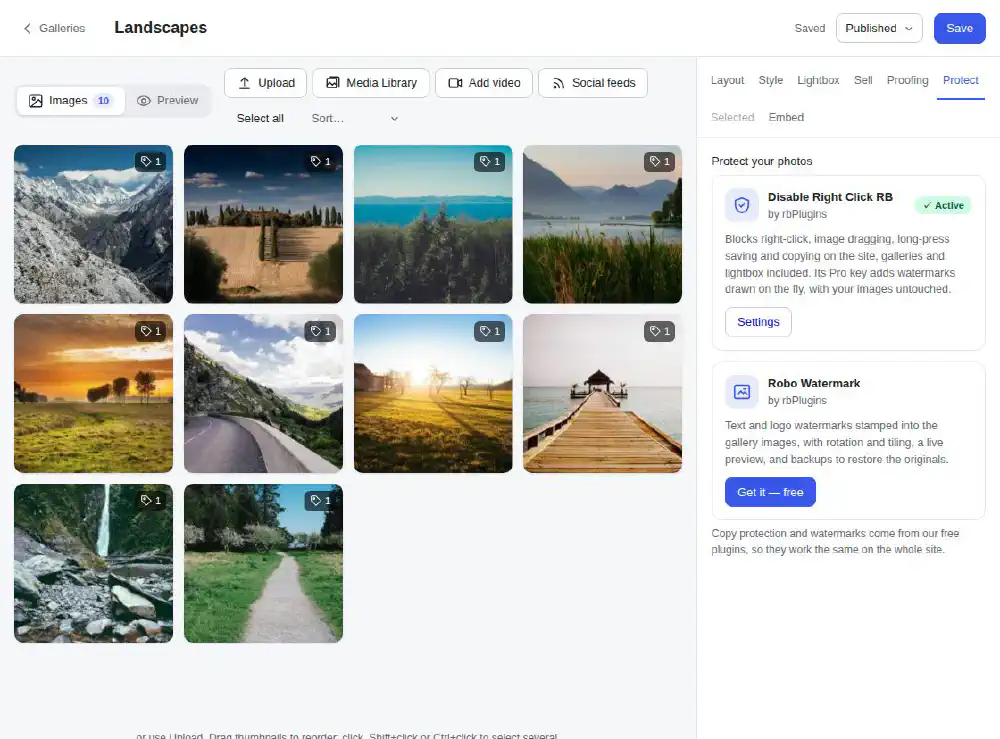
The Protect tab of the gallery editor shows both plugins and their state.
Disable Right Click RB blocks the right-click menu, image dragging, long-press saving on phones, text selection and copy shortcuts — in galleries and in the lightbox too.
On the Protect tab:
Its settings are under its own menu. See the Disable Right Click RB documentation.
Robo Watermark puts your text or logo on the images, and keeps a backup of every original so the watermark can be taken off again. It is not on WordPress.org: Get it — free opens its page, where you download it and install it with Plugins → Add New → Upload Plugin. Back on the Protect tab it shows as Active, with a link to its settings.
Installing and activating plugins needs an administrator. When someone else edits the gallery, the tab says Installed — an administrator can activate it on the Plugins page. If the server does not allow installing from the admin, install the plugin from Plugins → Add New or by FTP.
Build faster, cleaner, and more reliable WordPress websites using lightweight plugins designed for real-world workflows.
Get started now