Share your feature requests anytime
Search icon Our Plugins

Auto copy (PRO)

Overview

Auto copy makes copies without anyone clicking: as soon as a post is published for the first time, every matching rule makes one copy of it with a profile — on this site, or on another site of your network.

Typical uses:

  • Syndication — every news post also appears, as a draft, on a sister site of the network.
  • Translation drafts — with a profile whose Assistant translates with AI.
  • Archive or staging copies of everything published in a category.

Rules

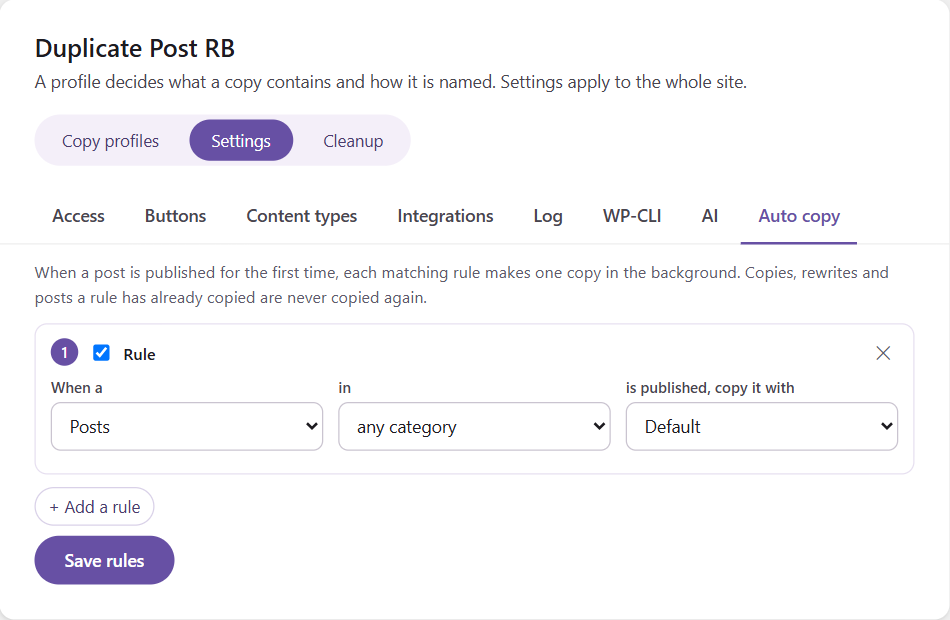
Open RB Plugins → Duplicate Post → Settings → Auto copy and click + Add a rule.

Each rule reads as a sentence:

When a [post type] in [category] is published, copy it with [profile] to the site [site]

  • Post type — posts, pages or any custom post type.
  • Category — for posts: any category, or one category.
  • Profile — decides what the copy contains, how it is named and what the Assistant does with it.
  • Site — on a network: this site or another one.

A rule can be switched off without deleting it. Up to 10 rules; click Save rules.


How it works

  • Only the first publication counts — updating a published post makes no new copy.
  • The copy is made in the background (WP-Cron), right after publishing, so publishing stays fast even when the profile uses AI.
  • Each rule copies a post once. Copies, rewrites (Rewrite & Republish) and posts a rule has already copied are never copied again — so rules cannot run in circles, even if a copy is published.
  • Questions of the profile’s Assistant take their default answers.
  • Every automatic copy is in the log.

Next steps

Simplify your WordPress workflow!

Build faster, cleaner, and more reliable WordPress websites using lightweight plugins designed for real-world workflows.

Get started now