

Simplify your WordPress workflow!
Build faster, cleaner, and more reliable WordPress websites using lightweight plugins designed for real-world workflows.
Get started now
One form can serve several purposes. With the PRO key, its answers decide who receives a submission and what the visitor sees afterwards.
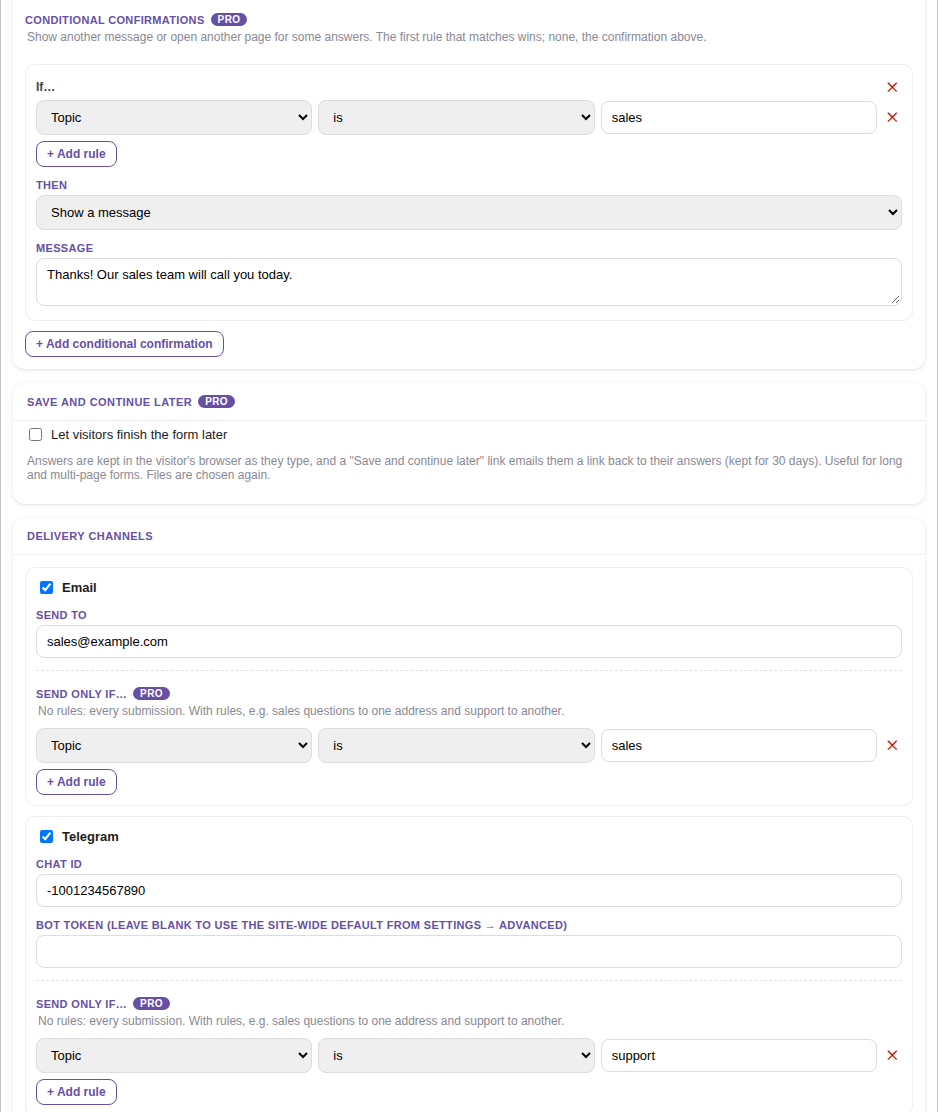
Each channel in the Delivery tab has a Send only if… section. With no rules, it sends every submission. With rules, it sends only those that match.
For example, on a form with a Topic field:
[email protected], with the rule Topic is sales.Sales questions go to the mailbox and support requests to the chat. A form has one channel of each kind. All submissions stay in the admin, whichever channels they go to.
The rules work as they do for fields: is, is not, contains, is empty, is not empty, with Match ALL rules or Match ANY rule.
They work on every channel: email, Telegram, webhook, Mailchimp and Google Sheets.
In the Delivery tab, under After submit:
The first rule that matches wins. If none matches, the visitor gets the form’s usual Confirmation.
For example, send visitors who chose Enterprise to a booking page, and thank the others with a message.
Build faster, cleaner, and more reliable WordPress websites using lightweight plugins designed for real-world workflows.
Get started now