

Simplify your WordPress workflow!
Build faster, cleaner, and more reliable WordPress websites using lightweight plugins designed for real-world workflows.
Get started now
Many plugins keep part of a post outside its content: SEO titles, custom fields, product data, page-builder layouts. Duplicate Post RB copies this data with dedicated integrations, switched on in RB Plugins → Duplicate Post → Settings → Integrations.
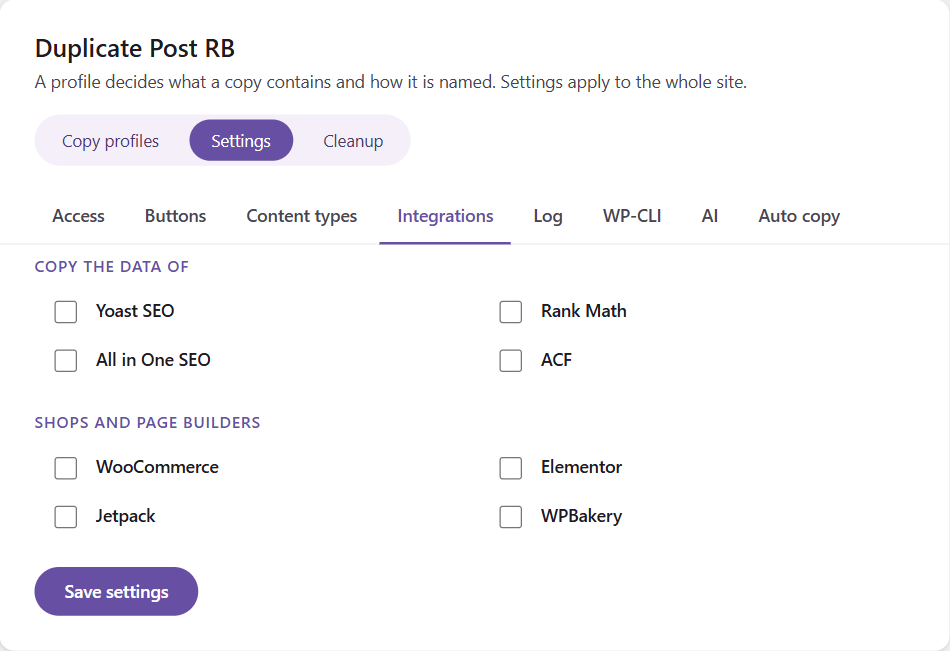
Integrations work whether or not the profile copies All post meta, and also for Rewrite & Republish.
Prices, sale dates, stock, shipping, attributes, the gallery, upsells and cross-sells, downloads and the product type — and every variation of a variable product, as variations of the copy.
Like WooCommerce’s own Duplicate, the copy gets a unique SKU and starts with no sales and no reviews.
With Rewrite & Republish the live product keeps its SKU, sales and variation IDs — orders stay linked; prices, stock and texts are updated.
The layout, page settings and edit mode, so the copy opens in Elementor exactly like the original. Elementor’s generated CSS is not copied: Elementor builds it for the copy.
The layout is in the content; the builder state and the custom CSS of the page and its elements are copied too.
SEO title and description, sharing and likes switches, newsletter access and the social share message. Never what Jetpack recorded about the original’s own life — shares already sent, e-mails already delivered.
On a network, the copy dialog offers a Site choice: the copy is created on another site of the network. Media files are copied to that site, or reused from a shared uploads folder — choose in Integrations → Multisite. Auto copy can send copies to another site automatically.
Build faster, cleaner, and more reliable WordPress websites using lightweight plugins designed for real-world workflows.
Get started now