

Simplify your WordPress workflow!
Build faster, cleaner, and more reliable WordPress websites using lightweight plugins designed for real-world workflows.
Get started now
A 404 is an address that does not exist: an old link on another site, a typo, a page you deleted. Visitors who land there usually leave. The 404 log shows these addresses so you can send them somewhere useful.
Open RB Plugins → Redirection → 404 log.
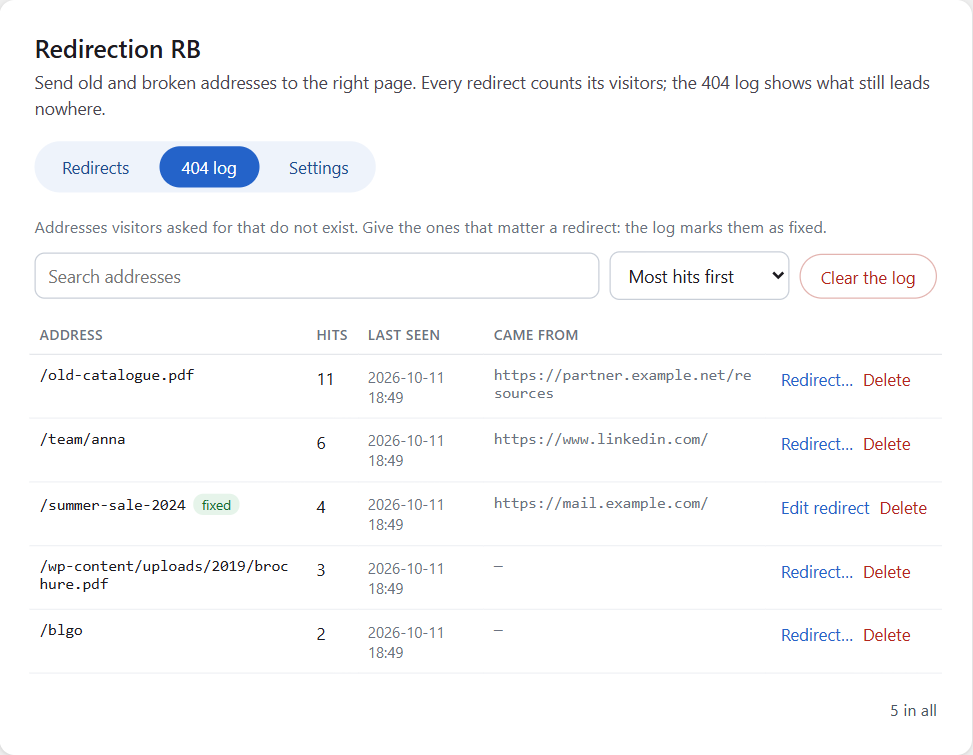
One row per address, however often it is asked for:
Sort by Most hits first to see what matters most, or Most recent first. Search finds addresses.
Not recorded: what browsers and bots ask for on every site — the favicon, touch icons, robots.txt, .well-known files.
Click Redirect… in the row. The dialog opens with the address as the source: choose the target and save. The row gets a fixed mark, and Edit redirect opens that redirect later.
Redirects made here are marked From the 404 log in the list of redirects.
In Settings → Every other 404 choose what happens to addresses that have no redirect:
Sending every 404 elsewhere hides real problems from search engines; prefer redirects for the addresses that matter.
Build faster, cleaner, and more reliable WordPress websites using lightweight plugins designed for real-world workflows.
Get started now