Simplify your WordPress workflow!
Build faster, cleaner, and more reliable WordPress websites using lightweight plugins designed for real-world workflows.
Get started now
The Delete tab removes comments in bulk. Unlike hiding on the Disable tab, this changes your database, so the tab always lets you count the matches before anything is removed.
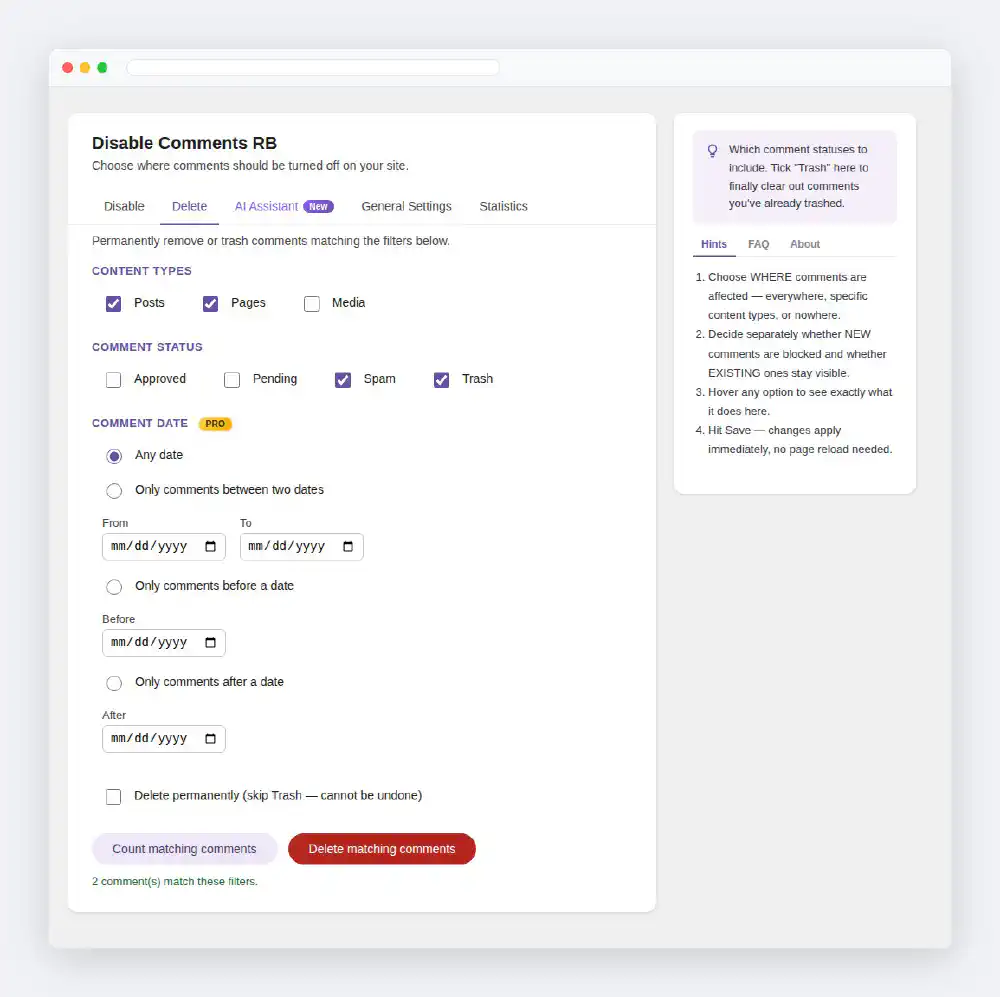
Content types
Which content types to search — the same list as on the Disable tab. Tick at least one.
Comment status
Which statuses to include: Approved, Pending, Spam and Trash. Tick at least one. Tick Trash to finally clear out comments you trashed earlier; Spam and Trash together are the usual clean-up.
Comment date (PRO)
Optional. Narrow the match to a date window: Only comments between two dates, Only comments before a date or Only comments after a date. Picking a date selects its option for you. The date you pick is itself excluded from before and after. Leave Any date to match by content type and status alone.
Comment type (PRO)
WooCommerce stores product reviews as a comment type of their own. Choose Comments only or Product reviews only to clear review spam without touching blog comments, or the other way round. All (comments + reviews) matches both.
Click Count matching comments. The tab shows how many comments match the filters — nothing is removed yet. Change the filters and count again until the number is what you expect.
Delete permanently (skip Trash — cannot be undone)
Click Delete matching comments and confirm. The tab reports how many comments were removed, and permanently deleted comments are added to the Deleted total on the Statistics tab.
On a large site, export a database backup before a permanent delete.
Build faster, cleaner, and more reliable WordPress websites using lightweight plugins designed for real-world workflows.
Get started now